


Paige Review for PAAB: Verifying a Product Card
When you link a Product Monograph, Paige reads it into a product card: the facts a PAAB reviewer checks a piece against. Paige can misread a monograph, so a person checks each fact before any review relies on it. Until the card is verified, the checks that use it wait.
This is part of Paige Review for PAAB: The Complete Guide. Only admins can correct and verify a card. Anyone who can open the Products page can read it.
What a product card holds
- Brand name and Non-proprietary name
- NOC/c (authorized with conditions): whether the product is authorized with conditions
- Indications
- Patient limits and limits of use, such as age limits or “not studied in”
- Contraindications
- Serious warnings (boxed)
- Special populations, each tagged Pediatrics, Geriatrics, Pregnancy, Breastfeeding, Renal impairment, Hepatic impairment or Other
- Dosing
- Dosage forms and strengths
Paige writes the facts in the monograph’s language, so the French card is in French. A group with nothing in the monograph shows None stated.
Which checks use it
The card is used by the checks that compare a piece with the monograph:
- the indication and the limits of use stated in the piece
- serious warnings, contraindications and the safety information a piece must carry
- claims staying within the Terms of Market Authorization
- dosing and strengths
- comparisons with other products whose cards are verified
Checking the card
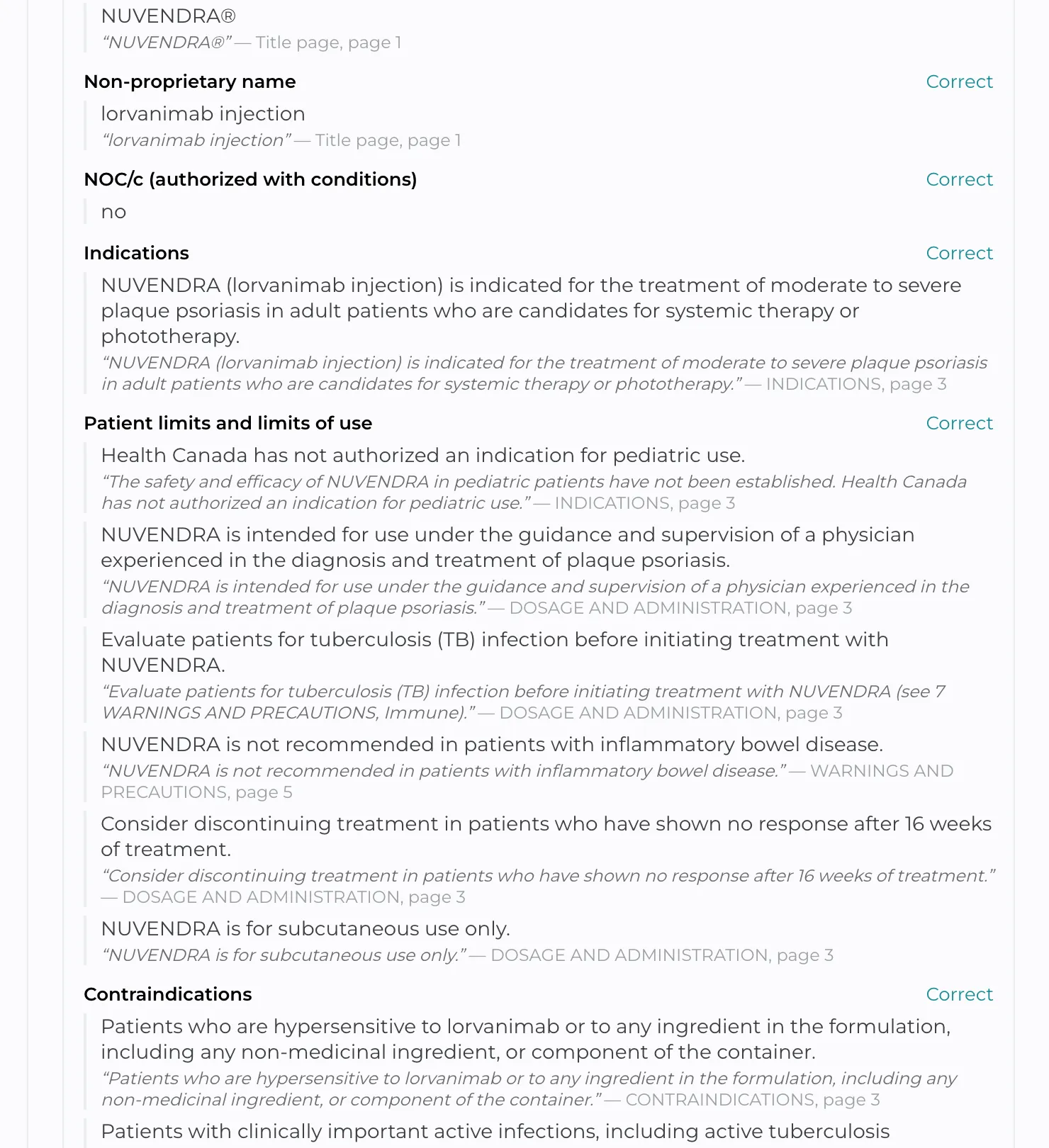
1. Open the product on the Products page. On the monograph’s row, click Open product card.
2. Each fact shows the words from the monograph it came from, with the section and page, for example Indications, page 3. Read each fact against those words.
3. A fact marked These words weren’t found in the monograph: check this fact. quotes words Paige couldn’t find in that section. Open the monograph and check that fact with particular care.
4. Look for what’s missing as well as what’s wrong: an indication Paige left out, a boxed warning, a special population.
Correcting a fact
1. Click Correct beside the group, for example Contraindications. The whole group opens for editing.
2. Change the Fact, the Monograph words it rests on, or both. Under Special populations, choose the group too.
3. Click Add for a fact Paige missed, or Remove for one that shouldn’t be there. A fact left empty is dropped.
4. Click Save. Paige checks the monograph words again and marks the fact corrected.
Copy the monograph words exactly, so Paige can find them and show where the fact comes from.
Verifying the card
When every fact is right, click Verify product card. The card shows Verified by your name and the date. From then on, every review of a piece about this product checks it against these facts.
You can’t verify a card while Paige is still reading the monograph, or while a newer version of it is waiting to be read. A card must have at least one indication.
When a verified card changes
- Correcting a fact on a verified card sends it back to Product card waiting to be verified. Verify it again.
- A new version of the monograph with different text replaces the card with a new one, which must be verified.
- Read card again builds the card again from the monograph. Your corrections are lost and the card must be verified again. Close and reopen the card to see the new one.
Good to know
- Verifying a card doesn’t re-review existing pieces. A piece reviewed before the card was verified shows A product card was verified after this review. Re-run to check the piece against it. at the top of its Paige Review panel.
- A review that ran before the card was verified says checks wait for a verified Product Monograph at the top of the panel, with a Go to Products link.
- A bilingual piece needs a verified card in both languages before the monograph checks run on it.
Still have questions?
Chat
9am – 5pm Eastern Time, by clicking the icon in the bottom right corner of the screen.