


Paige Review for PAAB: The Complete Guide
Paige Review reads a promotional piece the way a PAAB reviewer would and tells you, before you submit, what PAAB is likely to object to. It checks the piece against every provision of the PAAB Code it can check. It compares claims with the studies they cite and checks indications, safety and dosing against the product’s Product Monograph. It also lists what a person still has to confirm.
This guide walks through the whole flow, from setting up a product to sending a clean piece to PAAB. Each step links to an article with the details.
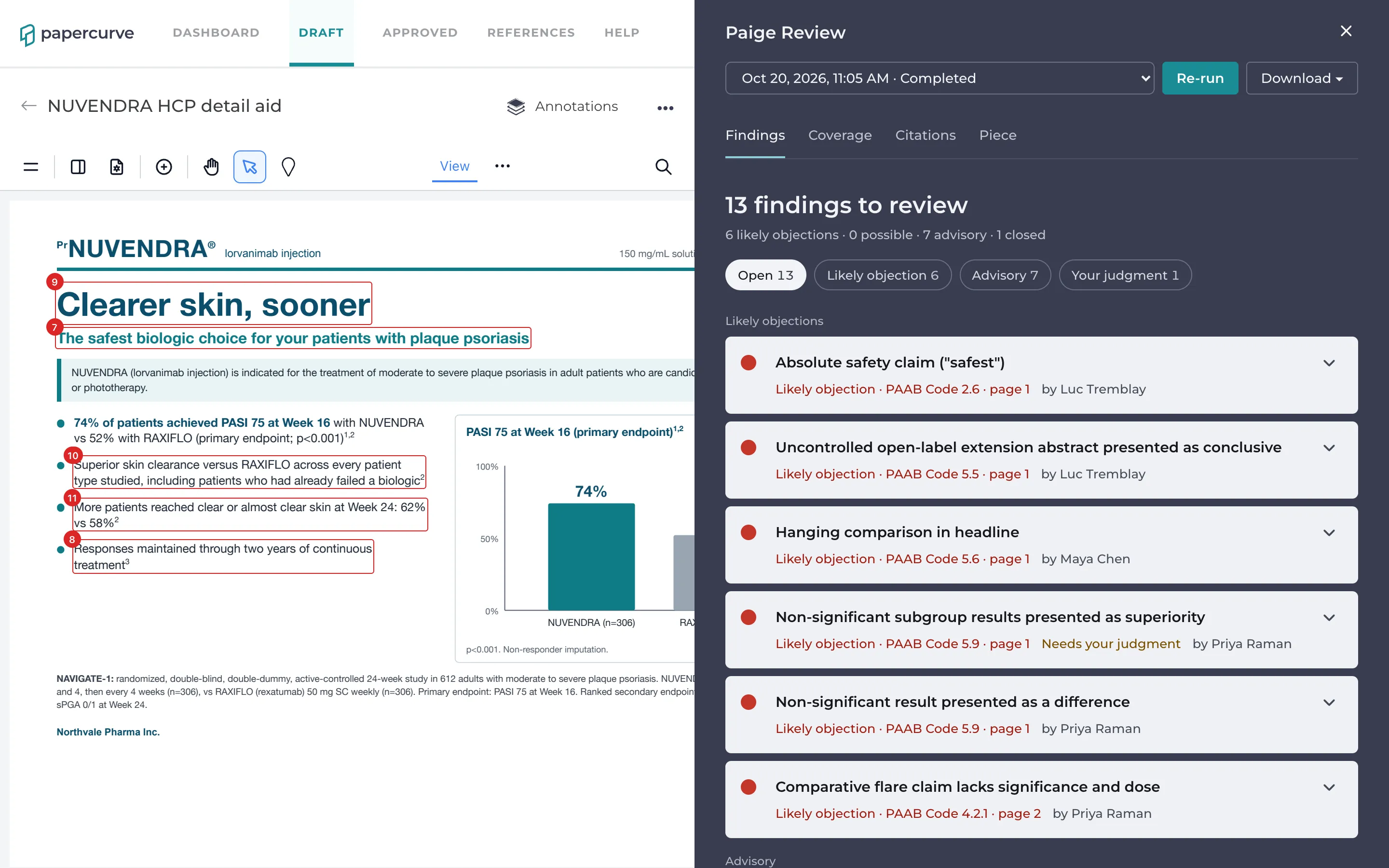
Paige Review is an assistant. It helps your team find problems early. It is not a PAAB opinion, and it doesn’t approve or release content: your reviewers still decide.
Before you start
Paige Review is switched on per library by Papercurve. A library that reviews to the PAAB Code has this version of Paige Review. Libraries that review to FDA requirements or to a custom rulebook have the version described in Paige Review. To have Paige Review switched on for a library, contact Papercurve support.
Paige reviews pieces in English, in French, and bilingual pieces with both. It reviews PDFs and anything Papercurve turns into a PDF, such as Word, PowerPoint and image files. It doesn’t review videos.
The flow at a glance
Set up once, and keep current:
- Add your products. For each product your libraries promote, an admin adds the product and links its Product Monograph in English and French. Paige reads each monograph into a product card. See Setting Up Products and Product Monographs.
- Verify each product card. An admin checks the facts Paige read from the monograph and verifies the card. Until a card is verified, the checks that rely on the monograph wait for it. See Verifying a Product Card.
- Keep your reference documents in Papercurve. Paige can only check that a claim is supported if the study it cites is in Papercurve as a reference document. See Getting Your Reference Documents Ready.
For every piece:
- Upload the piece. Paige reviews it automatically once Papercurve has processed the file, and again on every new version. You can also run a review yourself. See Running a Review.
- Check what Paige reviewed it as. On the Piece tab, confirm the audience, the type of piece and the product it promotes, and link the other-language version. These decide which checks apply. See The Piece Tab.
- Read the findings. The Findings tab lists every problem Paige found, by severity and page, marked on the page where it is. See Reading Findings.
- Check the claims against their studies. The Citations tab shows every claim that cites a source and whether the source supports it. Open Compare with study to see the claim and the study passage side by side. See Checking Claims and Citations and Compare with Study or Monograph.
- Decide on each finding. Mark each finding Will fix or Not an issue, and discuss it in its thread with your team. See Deciding on Findings and Discussing a Finding.
- See what Paige couldn’t check. The Coverage tab shows what Paige did with every provision of the Code, including the ones that need a person. See The Coverage Tab.
- Fix the piece and upload a new version. Paige reviews the new version, marks the issues it no longer finds as Fixed, and carries your decisions over. See New Versions and Fixed Findings.
- Download the report. The PDF report lists every finding with its status, plus a checklist of what a person must confirm before submission. See Downloading the Report.
If something doesn’t look right, see Paige Review for PAAB: Troubleshooting.
The example in these guides
Every article follows the same piece through Paige Review, so you can see each step on one example. The company, product, study and people are fictional.
- Northvale Pharma Inc., a Canadian pharmaceutical company, promotes NUVENDRA (lorvanimab injection) for moderate to severe plaque psoriasis.
- Its evidence is NAVIGATE-1, a head-to-head trial against a competitor, RAXIFLO (rexatumab): a clinical study report, a journal article (Ashworth 2025) and a congress abstract on the two-year extension (Delacroix 2025).
- Maya Chen, the NUVENDRA brand manager, uploads the NUVENDRA HCP detail aid to the Dermatology library. Paige reviews it.
- Dr. Priya Raman (medical reviewer), Luc Tremblay (regulatory affairs) and Sophie Gagnon (legal) are on its approval list. They work through the findings with Maya.
- Hannah Wright, the marketing operations manager, is the admin who set up NUVENDRA and verified its product cards.
Version 1 of the detail aid has problems a PAAB reviewer would object to: an absolute safety claim, superiority claimed across subgroups the study wasn’t designed to compare, a non-significant result presented as a win, and a two-year claim resting on a poster. Version 2 fixes most of them, and a French version follows.
Who can do what
| What | Who |
|---|---|
| Add and edit products, link monographs, verify product cards | Admins |
| Open and read a product card | Anyone who can open the Products page |
| Run or re-run a review, read findings, download the report | Anyone who can open the piece |
| Comment on a finding | Anyone who can open the piece |
| Change a finding’s status | Admins, the piece’s owner, the person who uploaded the version, and anyone on that version’s approval list |
| Change the piece profile, choose a reference document for a citation | Admins, the piece’s owner, and the person who uploaded the version |
| Switch Paige Review on for a library, raise the monthly limit | Papercurve support |
Words used in Paige Review
- Piece: the promotional content being reviewed.
- Finding: one problem Paige found, tied to a provision of the PAAB Code and, where it can be, to the words on the page.
- Likely objection, possible objection, advisory: how serious a finding is. See Reading Findings.
- Product card: the facts Paige read from a Product Monograph (indications, contraindications, warnings, dosing and so on), checked and verified by a person.
- Reference document: a study, abstract or other source stored in Papercurve that a piece cites.
- Study card: what Paige read from a reference document: its population, endpoints, results and limitations.
- Claim: a statement in the piece that carries citation numbers.
- Coverage: what Paige did with each provision of the Code on a review: checked it, found it not applicable, or left it for a person.
- Run: one review of one version. A version can have several runs if it was re-run.
Good to know
- Paige’s findings and reports are written in English, whatever the language of the piece.
- Each Papercurve workspace has a monthly limit on Paige Review. When it is reached, new reviews pause until the first of the next month. See Paige Review for PAAB: Troubleshooting.
- Paige doesn’t send emails or notifications about reviews or findings. Open the piece to see them.
Still have questions?
Chat
9am – 5pm Eastern Time, by clicking the icon in the bottom right corner of the screen.