


Paige Review for PAAB: Checking Claims and Citations
A claim in a promotional piece must be supported by the source it cites. PAAB checks that the study reports what the claim says, for the population and time point the claim gives, and that the source is the right kind of evidence. The Citations tab does the same check for every claim, so you can see at a glance which claims are well supported and which need work.
This is part of Paige Review for PAAB: The Complete Guide. For Paige to check a claim, the study it cites must be in Papercurve. See Getting Your Reference Documents Ready.
How Paige reads the citations
- Paige reads the piece’s numbered citation list, in each language of the piece.
- It finds each citation number on the page: a superscript, a number after the claim, or a range such as 1-3. Numbers that are quantities, such as 20 mg or week 12, aren’t citations.
- Each sentence or block that carries citation numbers is a claim.
- It finds each cited study among your reference documents and reads it.
- It compares each claim with what each of its studies says.
The Citations tab
Open Paige Review and click Citations.
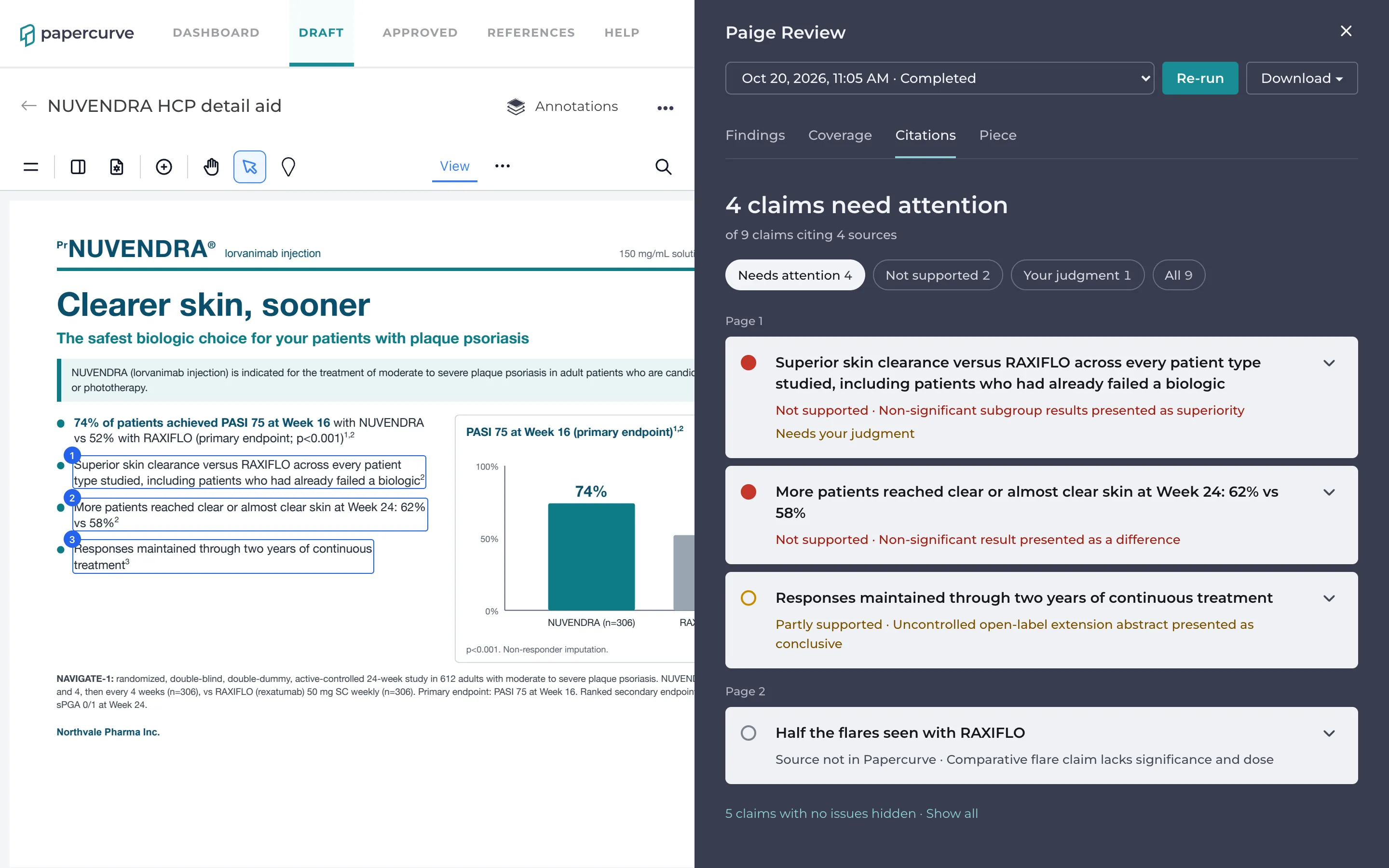
The top says how many claims need attention, for example 3 claims need attention, of 12 claims citing 6 sources. If the piece has citation numbers that aren’t in its list, it adds how many Paige couldn’t read.
Filters, each with a count:
- Needs attention: claims that aren’t supported, are only partly supported, cite a source that isn’t in Papercurve, or have a finding. This is where the tab opens.
- Not supported: only the claims whose source doesn’t support them.
- Your judgment: claims with a finding the Code leaves to a reviewer, such as a subgroup analysis.
- All: every claim.
Claims are grouped by page. The claims outside the filter are counted at the end, 9 claims with no issues hidden · Show all. While the tab is open, the claims are outlined on the page.
What a claim card says
Each card shows the claim’s words and its status:
- Not supported: the cited source doesn’t support the claim, or doesn’t address it.
- Partly supported: the source supports part of it, for example the result but not for every population the claim names.
- Source not in Papercurve: a cited source isn’t in Papercurve, so Paige can’t check it.
- Supported: the source supports the claim.
- Not checked: Paige didn’t compare it, for example because the study hasn’t been read yet.
- Cites the Product Monograph: the claim cites only the monograph. It’s checked against the verified product card instead of a study.
When the claim has a finding, its title is shown beside the status, for example Supported · Claim supported by a conference abstract or poster. A claim can be supported by its study and still have a problem with the kind of source it cites. Needs your judgment marks a finding for a reviewer to decide.
Open a card to see:
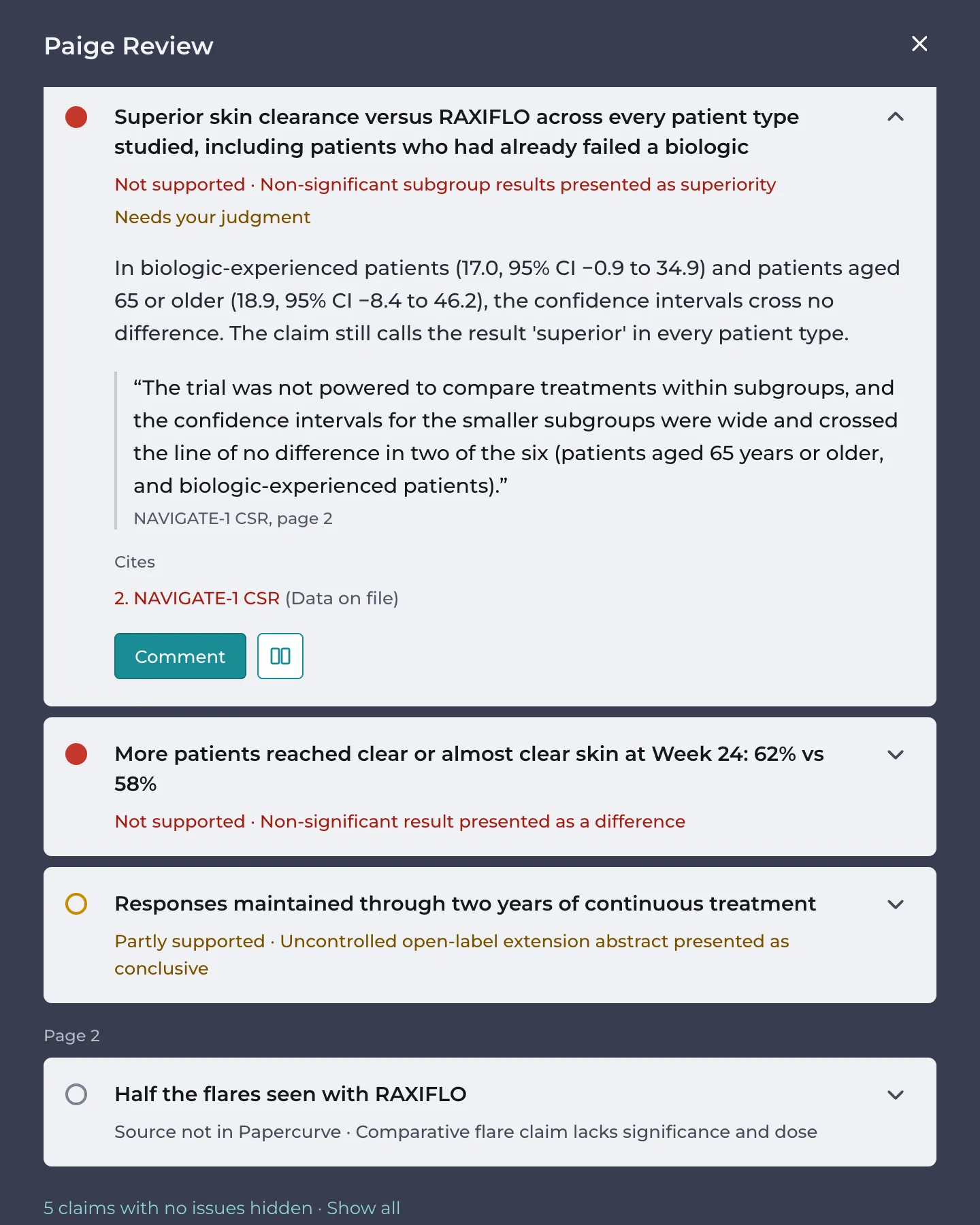
- the finding’s explanation, if it has one
- the study’s own words, in quotes, with the study’s title and page
- Cites: each source, coloured by whether it supports the claim. A weaker kind of source is named, for example (Abstract or poster).
- Comment, to open the finding’s thread
- Compare with study, the two-page icon, to see the claim and the study page side by side. See Compare with Study.
Claims and findings
The Citations tab and the Findings tab show the same review from two sides. A problem with a claim becomes a finding under the provision it breaks. For example:
- a result stated differently from the study (2.3, 3.6)
- a claim supported only by an abstract or poster (3.1.2)
- a post hoc or pooled analysis presented as a primary result (3.1.1)
- a secondary endpoint or a subgroup presented without context (3.1.10, 3.1.9)
- an observational study (3.1.11)
- a comparison the study doesn’t support (5.x)
- a chart that doesn’t match the study’s data (4.1)
Paige decides on findings separately from the status, so a claim marked Not supported may have no finding, and a Supported claim may have one. Decide on the finding where it is: on either tab, its status is the same.
When a source is missing
Click Find it in References on the claim and choose the study from your reference documents. Then click Re-run. If the study isn’t in Papercurve yet, upload it first. See Getting Your Reference Documents Ready.
When the citations can’t be read
The tab says why:
- This piece has no citation list.
- The piece keeps its citation list at a link, so its citations can’t be read here.
- This piece has a citation list, but Paige couldn’t split it into citations.
- Paige split this citation list itself because it has no clear numbering; check the citations against the piece. The claims are checked, but confirm each number points to the right source.
- This review is from before Paige read citations. Re-run the review to see them.
Good to know
- A bilingual piece has a citation list in each language. Each claim is matched to the list in its own language.
- The Citations tab isn’t available while a review is running, or on reviews made before the current Paige Review.
Next: Compare with Study
Still have questions?
Chat
9am – 5pm Eastern Time, by clicking the icon in the bottom right corner of the screen.