


Paige Review for PAAB: Compare with Study or Monograph
When Paige says a claim isn’t supported, you want to see for yourself. Compare with study puts the claim in your piece next to the page of the study it cites, with the passage Paige compared it with highlighted. You can step through every claim that needs attention without leaving the piece.
This is part of Paige Review for PAAB: The Complete Guide.
Opening Compare with study
Click the Compare with study icon, two pages side by side:
- on a claim card in the Citations tab, or
- on a finding in the Findings tab, when the finding is about a claim and its study.
The icon only shows when Paige has a passage from the study for that claim. Compare opens over the piece, in the same tab.
What you see
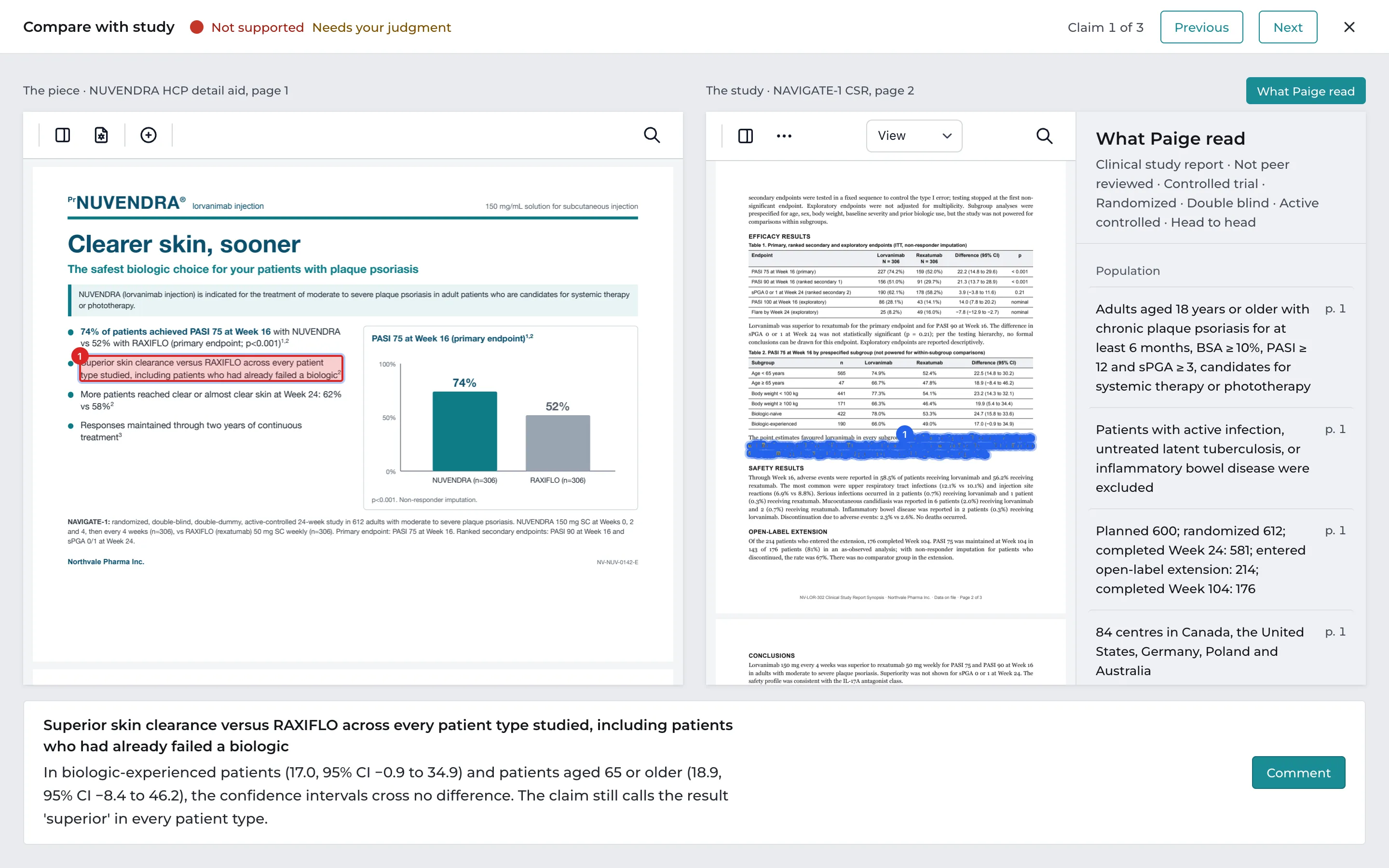
At the top: Compare with study, the claim’s status (for example Not supported), Needs your judgment when it applies, and Claim 2 of 5 with Previous and Next.
On the left, the piece: the page with the claim outlined, red when it isn’t supported and amber when it’s partly supported.
On the right, the study: the study’s page, with the passage Paige compared the claim with highlighted. Scroll the study to read around it.
Beside the study, What Paige read: the study card, switched on and off with What Paige read above the study. See below.
At the bottom: the claim’s words, Paige’s explanation, and Comment, which closes Compare and opens the finding’s thread.
Stepping through claims
Previous and Next go through the claims that need attention, in page order, and wrap around at the end. If you opened Compare from a claim with no issues, they go through every claim that has a study passage.
The study card
The study card is what Paige read from the study before checking its claims. It tells you at a glance what kind of evidence the study is:
- Its design, under the title: the kind of document (Journal article, Abstract, Poster, Clinical study report, Meta-analysis…), whether it’s peer reviewed, and the study design, such as Controlled trial · Randomized · Double blind · Active controlled · Head to head.
- Population, Treatment groups, Endpoints (each marked Primary, Secondary, Exploratory or Safety), Subgroups (marked prespecified when they were), Results, Adverse events, Authors’ conclusions and Limitations.
Every fact has the page it comes from. Click it to go to that place in the study. Paige keeps only facts whose words it found in the study.
The study card is read once per reference document, the first time a review cites it, and reused by every review that cites it after that. Monographs don’t have one: their facts are on the product card.
When a study card isn’t ready
- Paige is reading this document… The card appears by itself when it’s done, usually within a minute or two.
- Paige couldn’t read it: with the reason. Most often the PDF is a scan with no text. Upload a text PDF as a new version of the reference document.
- Paige hasn’t read this document. Click Read it now.
Read again reads the study again, for example after a new version of it was uploaded.
Compare with monograph
Findings Paige checked against the Product Monograph, such as an indication that isn’t word for word, a missing boxed warning or limit, a dose outside the monograph, or a photo of a patient the product isn’t authorized for, open the same way with Compare with monograph. It’s the same icon on the finding in the Findings tab.
- At the top: Compare with monograph, the finding’s severity and PAAB provision, and Finding 2 of 9 with Previous and Next, which go through the review’s other findings checked against the monograph.
- On the left, the piece: the page with the finding’s words or picture outlined. A finding about something missing has nothing to outline, so the left side shows the page the finding is on.
- On the right, the monograph: the Product Monograph linked to the product, in the language of the piece, open at the page with the words Paige relied on highlighted. Scroll it to read the whole section.
- At the bottom: the finding, Paige’s explanation, and Comment.
The monograph’s facts are on its product card. See Verifying a Product Card.
Closing Compare
Click the close button at the top right, or press Esc. You’re back on the piece exactly where you were, with the panel and the card you had open.
Good to know
- This claim isn’t in the review, or Paige has no passage from its study. means Paige has nothing to show side by side for that finding, for example because it isn’t about a cited claim.
- Compare shows the study’s current version. Compare with monograph shows the monograph version the review read.
Next: Deciding on Findings
Still have questions?
Chat
9am – 5pm Eastern Time, by clicking the icon in the bottom right corner of the screen.