


Paige Review for PAAB: Getting Your Reference Documents Ready
Paige checks that each claim in a piece is supported by the source it cites: that the study reports what the claim says, in the population and at the time point the claim gives. To do that, Paige needs the cited study itself. It finds it among the reference documents in Papercurve.
A source that isn’t in Papercurve can’t be checked. Paige shows the claim as Source not in Papercurve and adds a finding asking for the source.
This is part of Paige Review for PAAB: The Complete Guide.
Where reference documents need to be
Paige looks at every reference document in your workspace, in any library. A document is a reference document when it was uploaded as one:
- from References in the top navigation bar. See References Navigator.
- from a piece, while linking a reference. See Shared References.
A study uploaded as an ordinary document, rather than as a reference, isn’t searched. Product Monographs are different: Paige takes them from the Products page. See Setting Up Products and Product Monographs.
Upload the full text PDF of each study, not a scan, so Paige can read it. Give each one a clear title, ideally the study’s title or its trial name.
The best time to upload references is before you upload the piece, so the first review can already check its claims.
How Paige finds the cited study
Paige reads the piece’s numbered citation list, then looks for each citation in this order:
- A document someone chose for that citation on the Citations tab.
- The product’s Product Monograph, when the citation is a monograph and names a product in your workspace.
- A reference already linked to the piece with Papercurve’s references, when it matches the citation’s words.
- A reference document with the same DOI or PMID on its first two pages.
- A reference document whose title and first pages match the citation’s title, trial name, first author and year.
Trial names, first authors and years count for a lot. A citation that names a trial matches only a document that names the same trial. Paige always uses the latest version of a reference document.
French citations of English studies are matched too.
What Paige reads from a study
The first time a review cites a reference document, Paige reads it into a study card: the study design, population, treatment groups, endpoints, subgroups, results, adverse events, the authors’ conclusions and limitations, each with the page it comes from. Paige checks claims against the card and the study’s own words. See Compare with Study.
Paige reads up to six new studies during a review. If a piece cites more, the rest are read afterwards. The claims check then asks you to re-run the review once they’ve been read.
When a source is missing
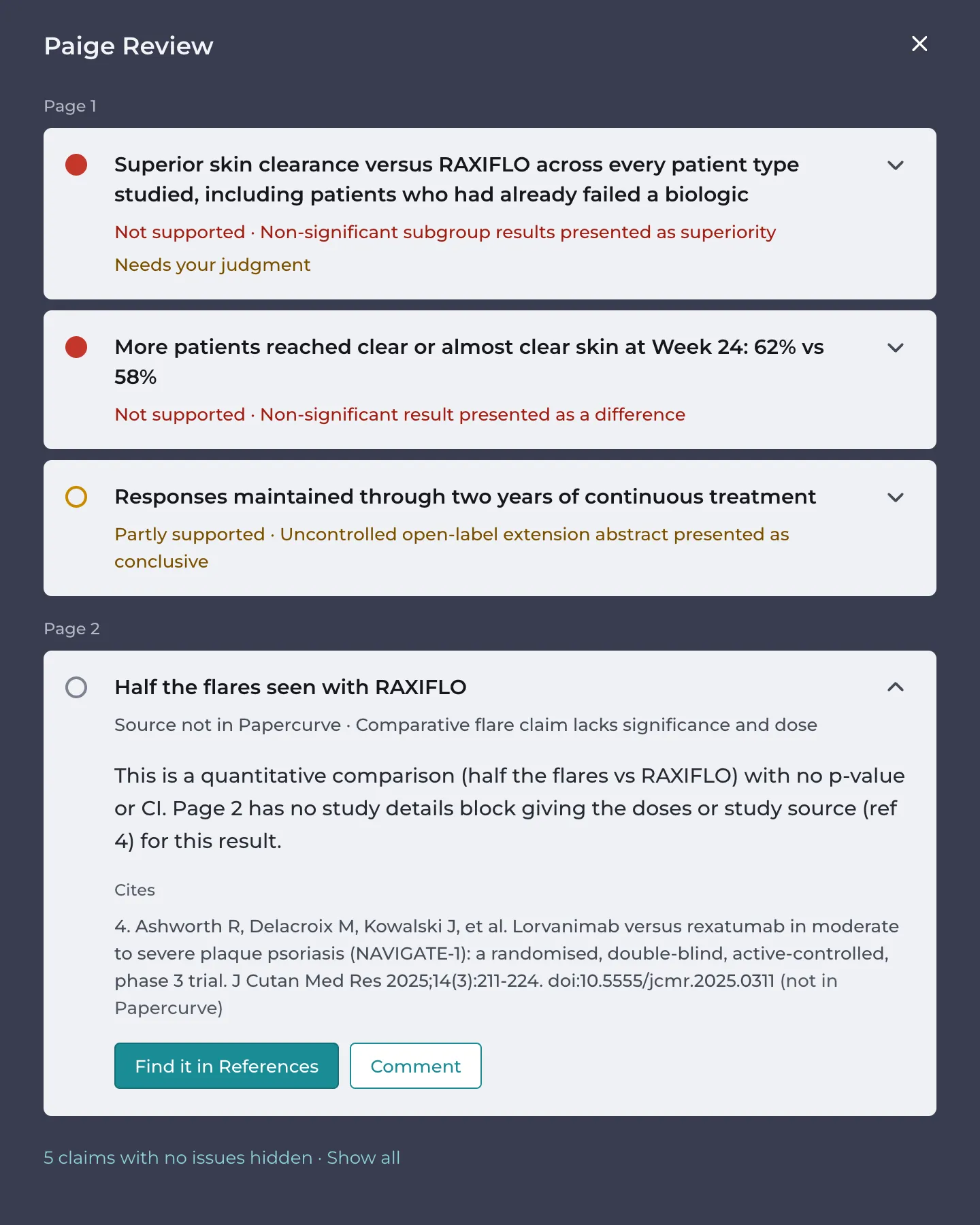
On the Citations tab, a claim whose source wasn’t found shows Source not in Papercurve with the citation, marked not in Papercurve. Unless the claim already has a finding of its own, the Findings tab also has an advisory finding for it, Citation N isn’t in Papercurve.
In the example, version 1 of the NUVENDRA detail aid claims “Half the flares seen with RAXIFLO” and cites the NAVIGATE-1 journal article (Ashworth 2025), which Maya hadn’t uploaded yet.
1. If the study isn’t in Papercurve yet, upload it as a reference document from References in the top navigation bar.
2. Open the piece, open Paige Review and go to the Citations tab.
3. On the claim, click Find it in References. When a claim cites several missing sources, there is a button for each: Find 3 in References.
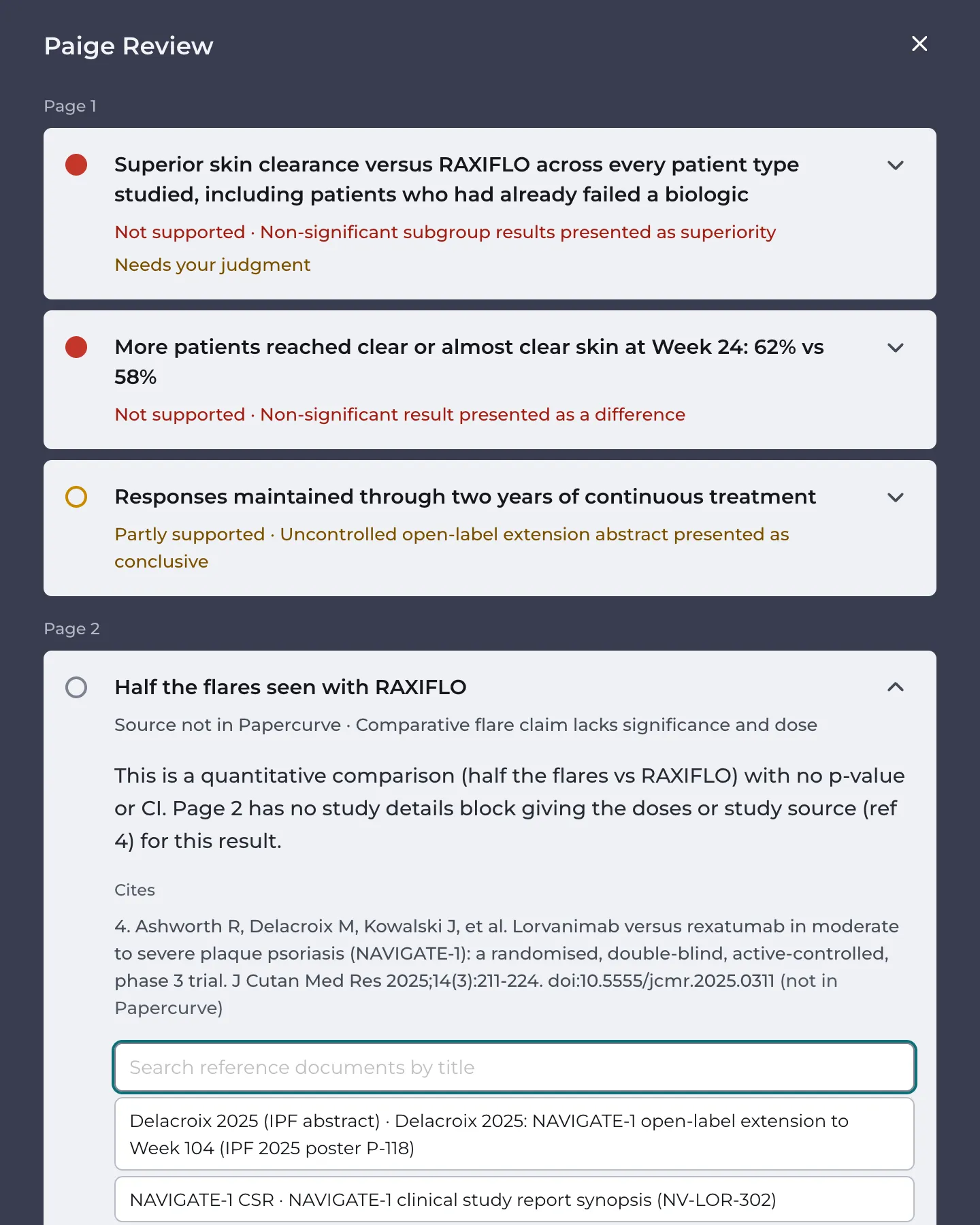
4. Search by title and click the reference document. Paige links it to the piece, as Papercurve’s references do, and reads it.
5. Click Re-run at the top of the panel. The claim is checked against the study on the new review.
Your choice is kept for that citation on every version of the piece, even if the citation is renumbered.
Changing a document
If Paige matched a citation to the wrong document, or you chose the wrong one, click Change next to the source on the claim card and choose another. A document you chose yourself can also be cleared with Clear my choice, so Paige looks for it again. Then click Re-run. A Product Monograph citation is changed on the product instead (see Setting Up Products and Product Monographs).
Choosing a document is open to admins, the piece’s owner and the person who uploaded the version.
Good to know
- Paige reads only what is cited in the piece’s citation list. A list kept on a website (“References available at…”) can’t be read, and the Citations tab says so.
- If a piece has no clear numbering in its citation list, Paige splits the list itself and asks you to check the citations against the piece.
- Claims that cite the Product Monograph aren’t checked against a study. They are checked against the verified product card instead.
Next: Running a Review
Still have questions?
Chat
9am – 5pm Eastern Time, by clicking the icon in the bottom right corner of the screen.