


Paige Review for PAAB: Reading Findings
A finding is one problem Paige found in the piece, tied to the provision of the PAAB Code it relates to and, where it can be, to the words on the page. The Findings tab lists them all.
This is part of Paige Review for PAAB: The Complete Guide.
The Findings tab
Open the piece, click Paige Review in the side panel. The panel opens on Findings.
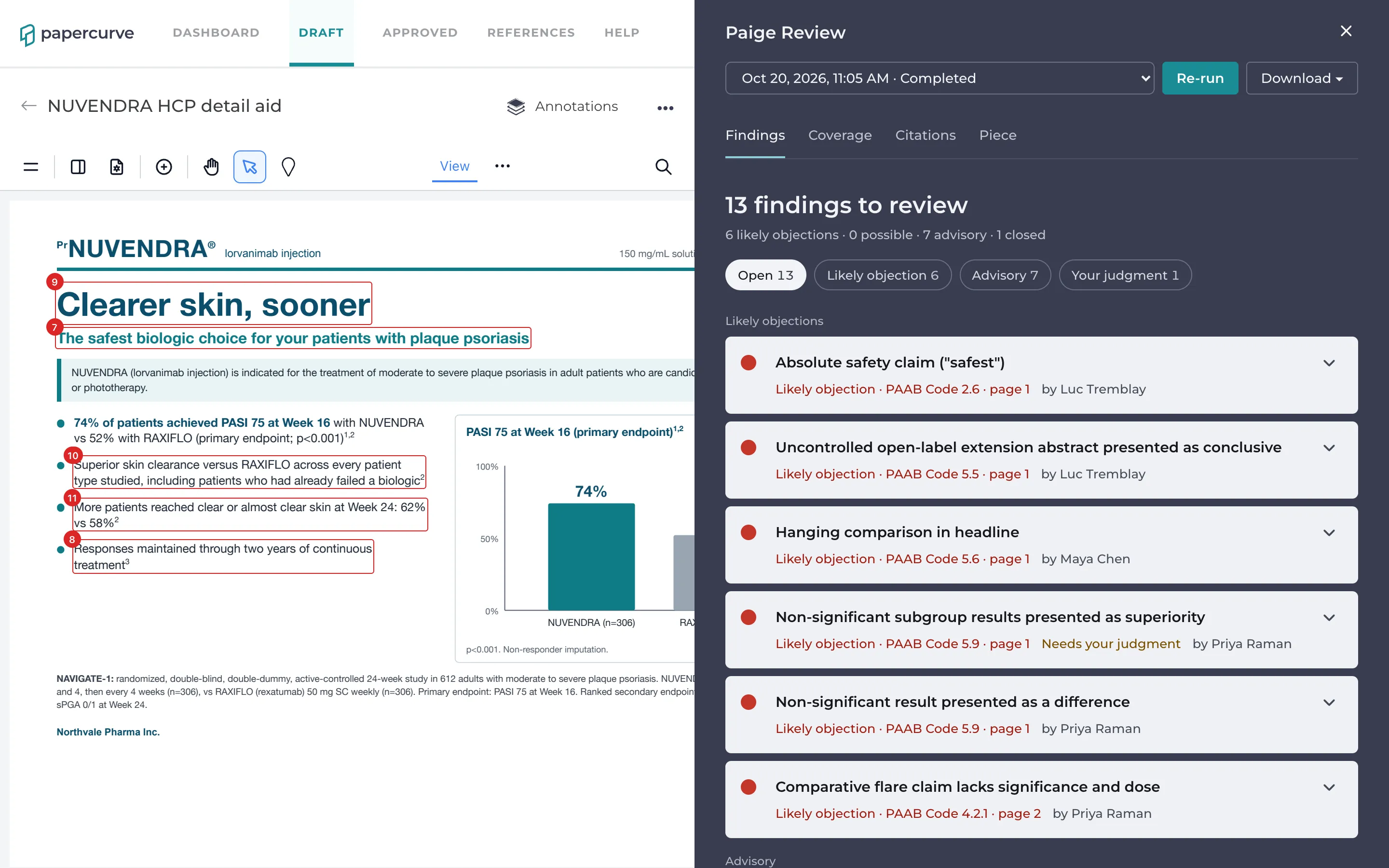
At the top, the summary says how many findings are left to decide, for example 5 findings to review, with a count by severity: 2 likely objections · 1 possible · 2 advisory · 3 closed. Closed findings are the ones marked Fixed or Not an issue.
Below it are filters, each with its count:
- Open: every finding not yet closed, including those marked Will fix. This is where you start.
- Likely objection, Possible and Advisory: one severity at a time.
- Your judgment: findings the Code leaves to a reviewer’s judgment (see below).
Findings are listed in page order, then in Code order. Closed findings are hidden: click Show closed at the end of the list to see them.
Severity
Each finding has one of three severities, shown by the colour of its ring and its label:
- Likely objection (red): PAAB is likely to object. Fix it or have a clear reason it’s acceptable before you submit.
- Possible objection (amber): PAAB may object, depending on context Paige can’t fully judge. A reviewer should decide.
- Advisory (blue): a point to check, a good-practice note, or something Paige isn’t confident about. Look at it, but it isn’t an objection on its own.
Each provision of the Code has a usual severity. Paige may lower a finding’s severity when the evidence is weaker, but never raises it above that.
Your judgment
Some provisions leave the call to the reviewer, for example presenting a subgroup analysis (PAAB Code 3.1.9), an observational study (3.1.11) or data from a non-Canadian formulation (5.14). Paige raises these as possible objections at most and tags them Needs your judgment. Read the study and decide.
What a finding shows
The closed card shows the finding’s title, then its severity, Code section and page, for example Likely objection · PAAB Code 5.9 · page 1. Click it to open it. An open card shows:
- What Paige found: the problem, in plain words, with what the Code requires.
- The source it compared with, when there is one: the study’s or the Product Monograph’s words, with the document’s title and page. Click the title to open it side by side with the piece (see below).
- Paige suggests: a way to fix it.
- Also raised under: other provisions the same problem breaks. Paige raises one problem once, under its main provision, and lists the others here.
- Its status, and who set it.
- Comment, to discuss it with your team. See Discussing a Finding.
- Compare with study, the two-page icon, when the finding is about a claim and its study, or Compare with monograph, the same icon, when Paige checked it against the Product Monograph. See Compare with Study or Monograph.
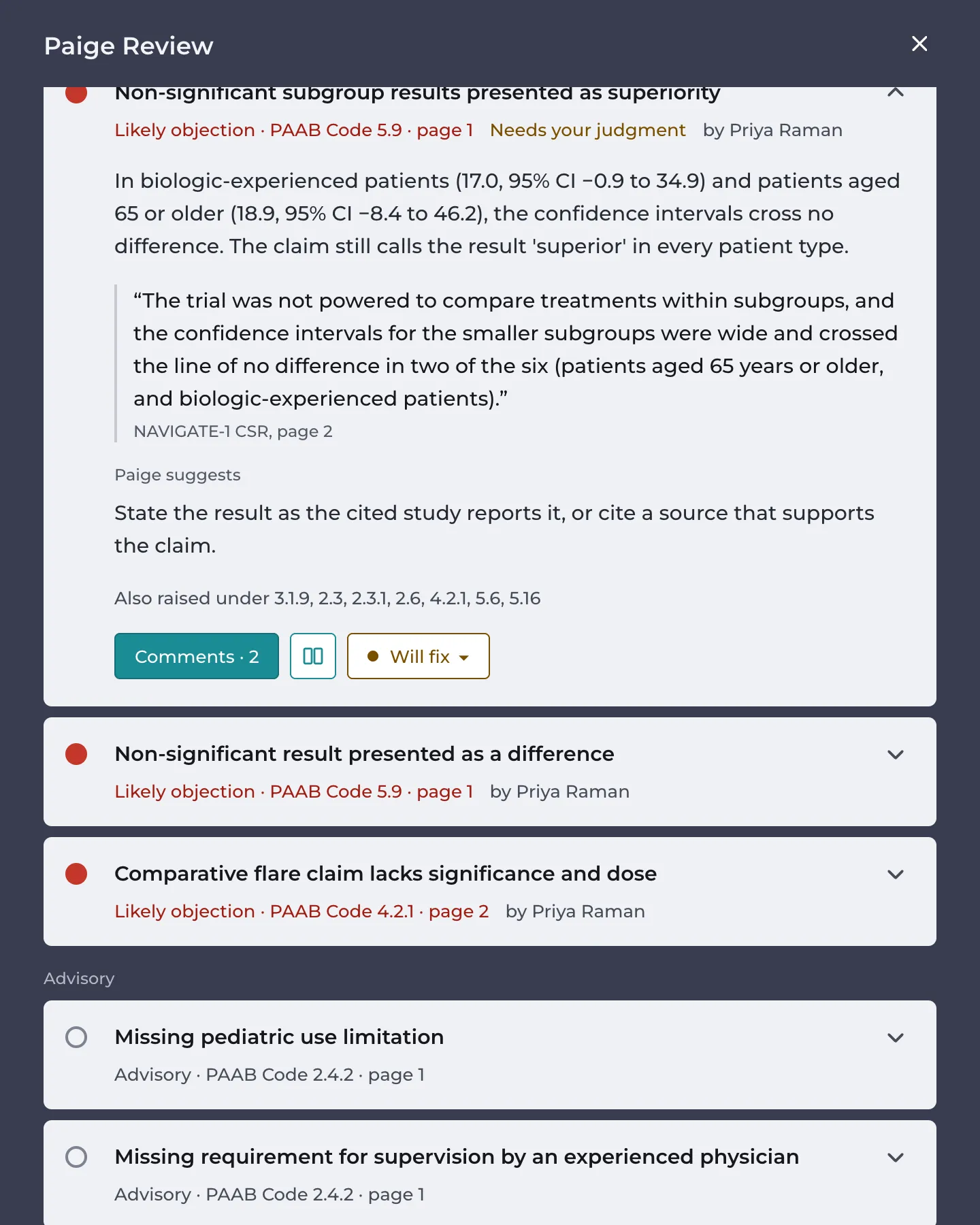
In the example, Paige flags the detail aid’s claim of “superior skin clearance versus RAXIFLO across every patient type studied”. The NAVIGATE-1 study report says the trial wasn’t powered to compare subgroups, and two of the six crossed the line of no difference.
A card can also carry a note about its history, such as Carried over from an earlier review or Resolved before, found again. See New Versions and Fixed Findings.
Findings about pictures
Paige reads the photos and illustrations as well as the copy: who they show and roughly how old they are, what they suggest, and any words drawn into them. A picture can be a finding on its own:
- a child or teenager shown as the patient for a product authorized in adults (PAAB Code 2.10)
- an image used to frighten (5.15), or one that may offend (2.5)
- a picture that suggests an outcome the claims don’t support, or a benefit-only image that outweighs the safety information (2.1, 2.4)
- an absolute claim drawn into an image, such as “100%” in a product shot (2.6)
A finding about a picture is marked on the whole picture, as an approximate area. Paige judges pictures the way it judges copy, so check each one: a child shown with a parent who is the patient isn’t a problem, and Paige may not always tell the difference.
Seeing findings on the page
While the Paige Review panel is open, the findings in the list are marked on the piece, outlined in the colour of their severity. Comments, references and claims are hidden meanwhile, so the page shows only Paige’s marks. They come back when you close the panel.
- Click a finding to go to it on the page.
- Some findings mark more than one place. A fair balance finding, for example, marks the claim and the safety information it’s weighed against.
- ≈ Approximate area on the page, estimated by Paige means the mark is an estimate. Paige uses one for a picture, a chart or a logo, where there are no words to outline. Treat it as “look around here”.
- Findings about the page or the piece as a whole aren’t marked. Clicking one takes you to its page.
To see the marks with the panel closed, open the annotation layers menu above the piece and switch on Paige Review. See Annotation Layers.
Good to know
- Paige raised no findings on this piece means no check raised anything. Look at the Coverage tab for what Paige checked and what still needs a person. See The Coverage Tab.
- Paige’s findings are written in English, whatever the language of the piece. The words it quotes are in the piece’s language.
- Some findings come from the claims check on the Citations tab, about a claim and its study. They are listed here with every other finding.
Still have questions?
Chat
9am – 5pm Eastern Time, by clicking the icon in the bottom right corner of the screen.